Spotless: clean other contact fields, not just email
Spotless: clean every contact field, not just email
Spotless finds and fixes messy contact data in your email service provider — names typed in ALL CAPS or all lowercase, phone numbers in inconsistent formats, and junk entries like "asdf asdf". mailfloss already removes bad email addresses. Spotless cleans what's left.
Spotless is in beta and off by default. You turn it on per connection.
How it works
- Scan. When mailfloss imports or verifies your contacts, Spotless reads each contact's profile fields and builds a report. Nothing is changed.
- Review. You see the proposed changes and approve the ones you want.
- Apply. mailfloss writes the approved changes back to your ESP, then reads each contact back to confirm the change landed.
Nothing is ever written without your approval, and nothing is written automatically as contacts arrive. You choose when to apply.
Turning Spotless on
Go to Integrations, select your connection, and find the Spotless section.

The header shows how many issues Spotless found. Click the arrow to expand it.
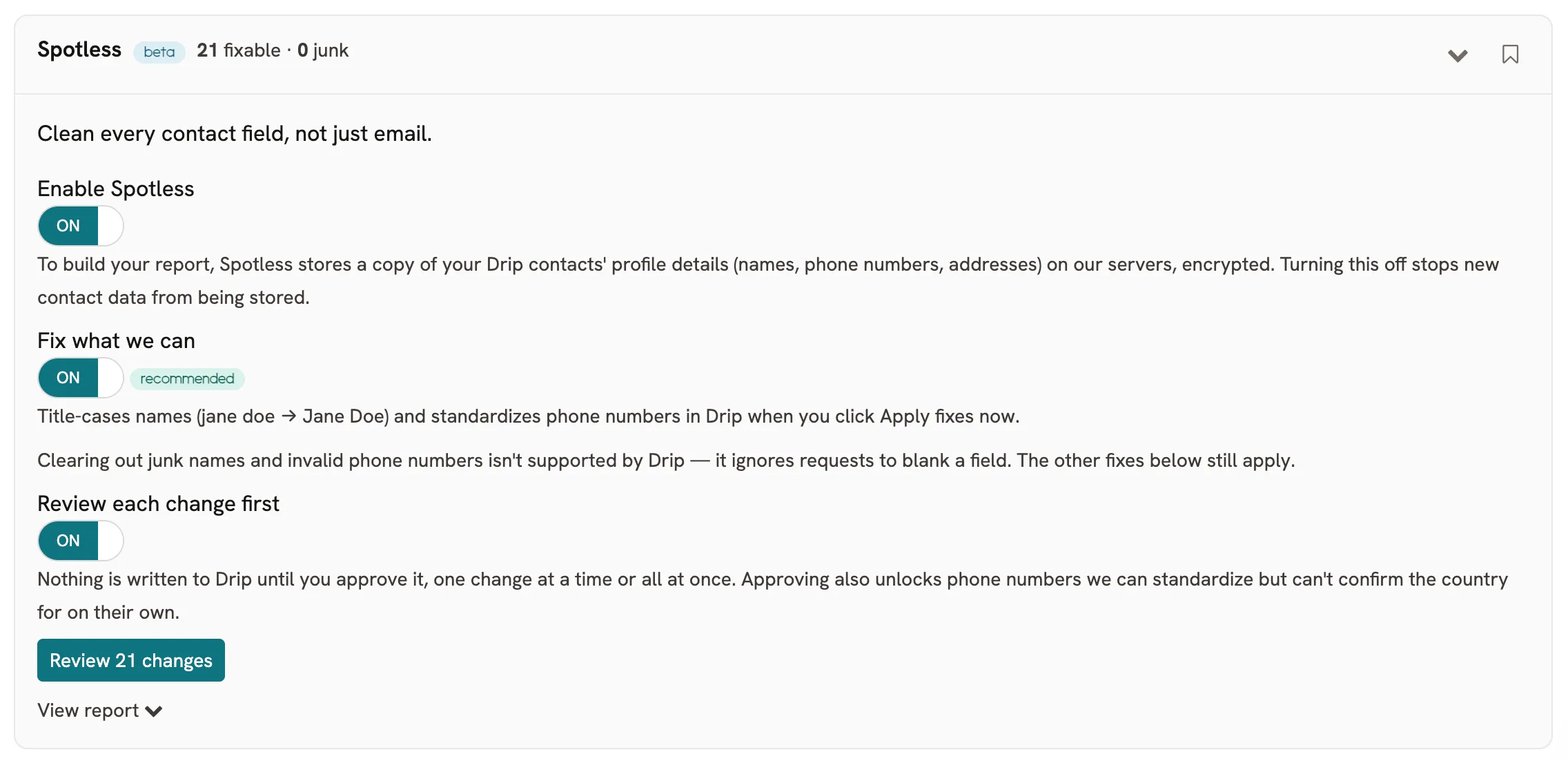
Enable Spotless
Turns scanning on. To build your report, Spotless stores a copy of your contacts' profile details — names, phone numbers, addresses — on mailfloss servers, encrypted. Turning this off stops new contact data from being stored.
You need this on before anything else works. Run a scan and floss to build your first report; contacts are scanned during import.
Fix what we can
Allows Spotless to correct values. It title-cases names (jane doe → Jane Doe) and standardizes phone numbers into international format when you click Apply fixes now.
This toggle alone does not write anything. It marks the connection as willing to receive fixes.
Clear out junk
Blanks names that are clearly not names — asdf asdf, Test Test — and phone numbers confirmed invalid.
This is irreversible. Once a junk value is cleared, mailfloss cannot restore it. The toggle is off by default and labelled accordingly.
Some ESPs ignore requests to blank a field. On those connections this toggle is hidden and the panel says so, because turning it on would do nothing.
Review each change first
Recommended, and on by default.
- On — every proposed change waits in a queue for you to approve or reject, one at a time or all at once.
- Off — clicking Apply fixes now writes every change that clears the confidence bar, with no itemised confirmation.
Review also widens what Spotless will offer. Some phone numbers can only be standardized by assuming the country from the contact's address. mailfloss will not make that assumption on its own, so those numbers appear only in the review queue. Approving one tells mailfloss the country is right.
Reading the report
Click View report to see the breakdown.
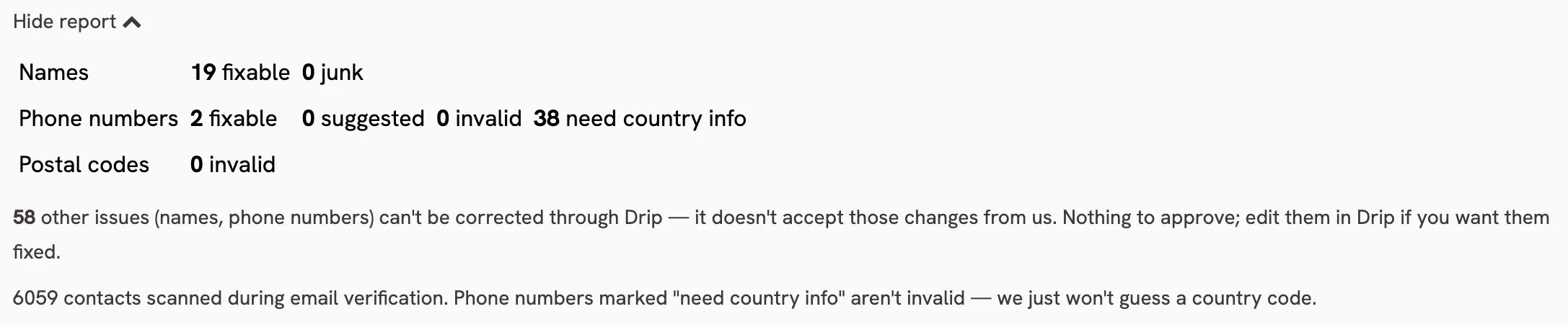
- Names — fixable — casing or spacing Spotless can correct.
- Names — junk — entries that look like filler rather than a real name.
- Phone numbers — fixable — numbers that can be standardized with confidence.
- Phone numbers — need country info — valid numbers with no country code, where the country cannot be confirmed. These are not invalid. mailfloss will not guess a country code.
- Postal codes — invalid — postal codes that do not match the contact's country. Reported only; Spotless does not correct addresses.
- Other issues — problems your ESP will not let mailfloss change. Nothing to approve; edit them in your ESP if you want them fixed.
The footer tells you how many contacts were scanned.
Approving and applying
Click Review N changes.
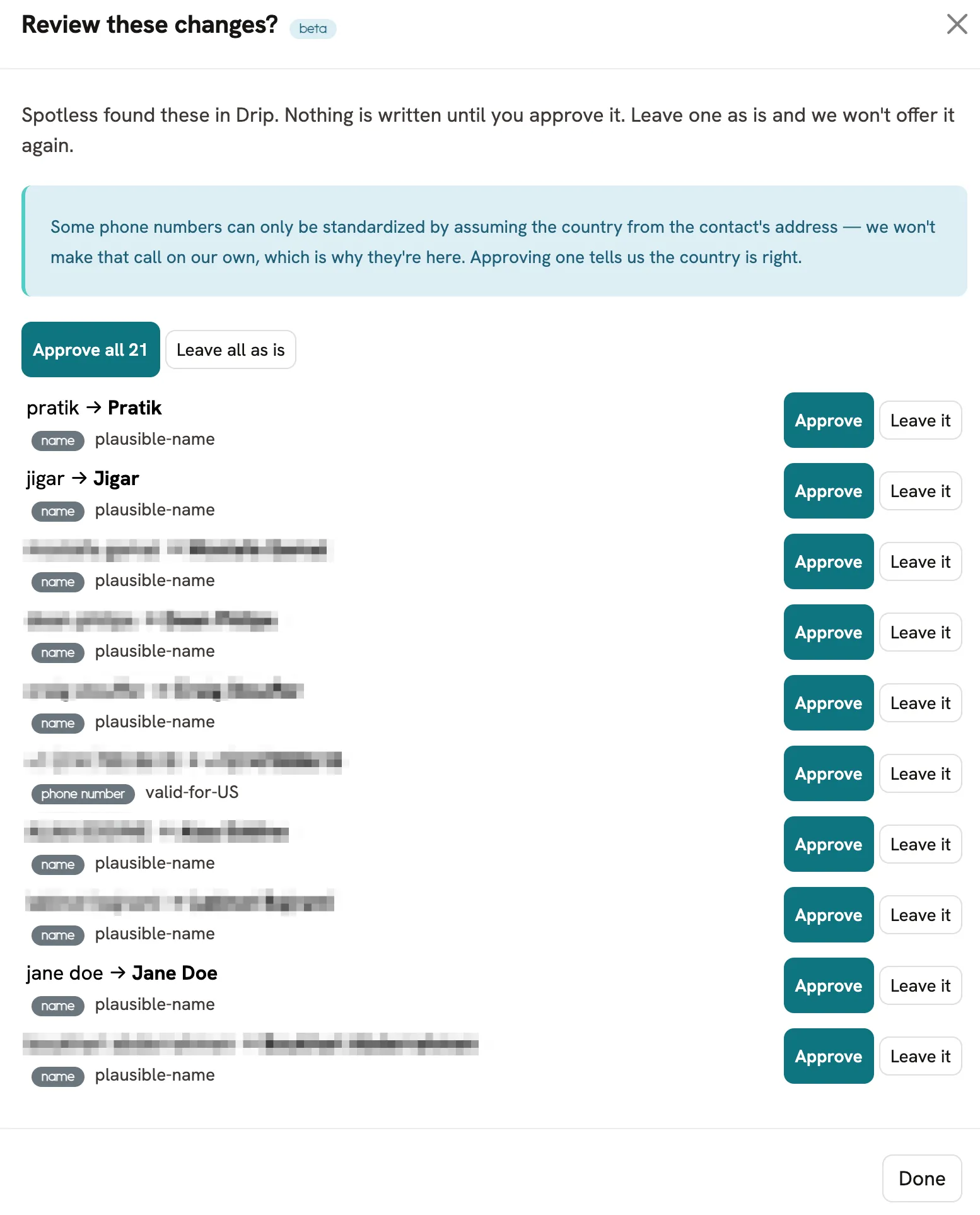
Each row shows the current value, the proposed value, and why Spotless flagged it. plausible-name means the value looks like a real name that needs tidying, not junk.
- Approve — queue this change to be written.
- Leave it — reject it. Spotless will not offer that change again.
- Approve all — queue every change in the list.
Approving does not write anything yet. When you're done, click Apply N approved changes.

After the write, mailfloss reads each contact back from your ESP and checks the new value actually landed. If a write does not verify, mailfloss stops applying to that connection and flags it rather than retrying.
Supported ESPs
Spotless scans and reports on 28 ESPs.
Spotless writes changes back to the 16 below. Every one has been tested against a live account to confirm that writing one field leaves every other field untouched.
ESP | Fixes names | Fixes phone numbers | Clears junk |
|---|---|---|---|
HubSpot | Yes | Yes | Yes |
Mailchimp | Yes | Yes | Yes |
Klaviyo | Yes | Yes | Yes |
MailerLite | Yes | Yes | Yes |
Brevo | Yes | Yes | Yes |
Campaign Monitor | Yes | Yes | Yes |
Intercom | Yes | Yes | Yes |
Customer.io | Yes | Yes | Yes |
ClickFunnels | Yes | Yes | Yes |
Drip | Yes | Yes | No |
Mautic | Yes | Yes | No |
Gist | Yes | Yes | No |
Braze | Yes | Yes | No |
Iterable | Yes | Yes | No |
Keap | Yes | No | Yes |
Kit | First name only | No | Yes |
Why some cells say No
- Clears junk — No. These ESPs ignore requests to blank a field. mailfloss cannot clear a value there, so the toggle is hidden.
- Keap — phone. Keap replaces a contact's entire phone list on every update, so writing one number would delete the others. mailfloss does not write phone numbers to Keap rather than risk that.
- Kit — first name only. Kit's contact record has a first name field and no last name field.
On the other 12 scanned ESPs, Spotless builds the report but cannot write changes back. You'll see the report with no fix toggles.
Common questions
Does Spotless change anything on its own? No. Every change needs you to click Apply, whether or not the review queue is on.
Can I undo a fix? Name and phone corrections can be changed back manually in your ESP. Cleared junk values cannot be recovered, which is why that toggle is off by default and marked irreversible.
Does Spotless send email or change subscription status? No. It only edits profile fields. Subscription status, tags, and consent are left alone, and mailfloss verifies that after every write.
What happens to my contact data? Profile details are stored encrypted, only for connections where you've enabled Spotless. Turning off Enable Spotless stops new data being stored. Data is deleted when you disconnect the integration or close your account.
Why does my report show issues that aren't in the review queue? Those are issues your ESP won't accept changes for. They're counted separately in the report and marked as nothing to approve.