How does the Typo Fixer feature work?
The way our Typo Fixer works is if an email address fails a verification test, we check to see if a suggestion exists. If it does, we reverify the email address to make sure the suggestion is valid. If it is, we attempt to fix it automatically if Typo Fixer is on in the Typo Fixer tab and the Cleanup tab is set to an automatic action (Unsubscribe, Delete from your provider, or Update a field).
The Typo Fixer works for commonly misspelled email services such as Gmail, Hotmail, AOL, and Yahoo.
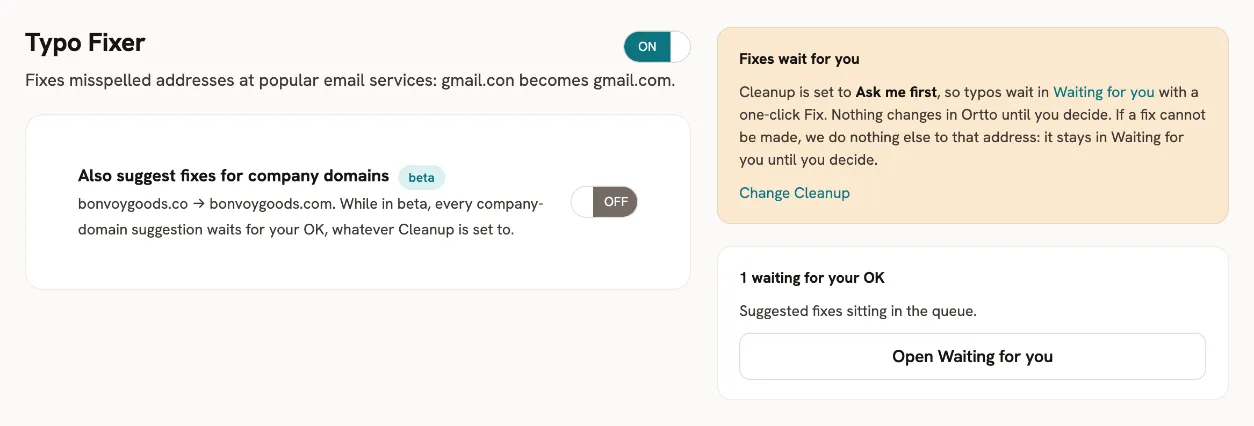
To also get suggestions for misspelled company domains, turn on Also suggest fixes for company domains (beta) in the Typo Fixer tab. While in beta, every company-domain suggestion waits for your OK, whatever Cleanup is set to.
If Cleanup is set to Ask me first, typos wait in the Waiting for you tab with a one-click Fix. Clicking it fixes the typo inside your email service provider.
Note:
This button only appears if there's a typo suggestion to fix. Important:
The Typo Fixer feature only corrects the domain part of the email address. The local part (everything before the "@" symbol) cannot be changed to ensure data integrity.