Fixing typos in company email domains
mailfloss has always corrected typos in common email domains — gmial.com → gmail.com. It can now also catch typos in company domains, like [email protected] when the real address is [email protected].
Company domains work differently, and the difference matters: mailfloss never corrects a company domain on its own. Every suggestion waits in a review queue until you approve it.
This feature is in beta and off by default. You turn it on per connection.
Why company domains need your approval
With a common provider, mailfloss can be confident. There is one gmail.com, and gmial.com is not a real domain.
Company domains are different. acme.co and acme.com can both be real, and belong to two different companies. Correcting one to the other would send your email to the wrong business and lose you a real subscriber.
mailfloss can often tell that a domain looks like a typo. It frequently cannot prove the corrected address actually exists. Rather than guess, it asks.
This is why the setting is a suggestion feature, not a fixing feature.
What mailfloss filters out before you see anything
Suggestions are not raw guesses. Before a correction reaches your queue:
- Dead domains are dropped. If the corrected domain has no mail server at all, the suggestion is discarded rather than shown.
- Each suggestion is checked against the connection it came from, so one integration's queue never mixes with another's.
- Decisions are final. Once you fix or dismiss an address, mailfloss will not raise it again for that address, even on later scans.
What remains is the class mailfloss can resolve but cannot confirm — which is exactly the class worth a human glance.
Turning it on
- Go to Integrations and select your connection.
- Make sure Fix Typos is on. Company domain suggestions are part of typo fixing, so the parent setting must be enabled first.
- Turn on Also suggest company domain fixes.
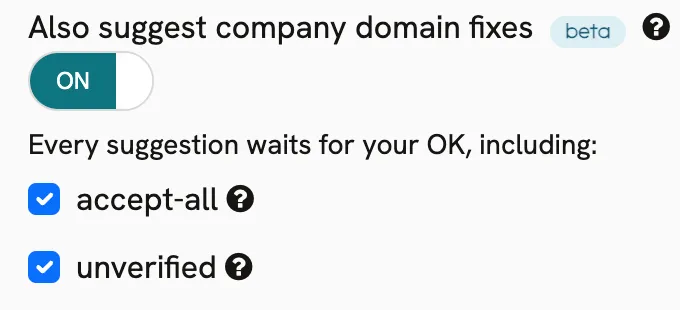
Turning it off at any time stops new suggestions.
Choosing which suggestions you see
Under the toggle, two checkboxes control which kinds of suggestions reach your queue. Both are on by default.
Checkbox | What it means | Uncheck if |
|---|---|---|
accept-all | The corrected domain accepts mail for any address, so mailfloss cannot confirm that this exact mailbox exists. | You only want suggestions mailfloss could individually confirm. |
unverified | The mail server did not give a clear answer during verification. | You want a shorter, higher-certainty queue. |
Suggestions that mailfloss did confirm always appear, regardless of these two settings.
Unchecking a box also removes matching suggestions already waiting in your queue. Anything you have already decided on stays decided.
Reviewing suggestions
Suggestions collect in your review queue. Each row shows the current address, the proposed correction, and a badge when the corrected domain is accept-all.
For each one:
- Fix it — applies the correction to that contact in your ESP.
- Leave it — dismisses the suggestion. mailfloss will not suggest it again for that address.
Nothing is written until you click Fix it.
Examples
Current address | Suggested correction |
|---|---|
Common questions
Will mailfloss ever change a company domain automatically? No. Company domain corrections are approval-only by design. This is different from common-provider typos, which mailfloss fixes automatically when Fix Typos is on.
What happens if I ignore the queue? Nothing. Suggestions wait indefinitely and are re-checked on later scans. Your contacts are unchanged.
Can a suggestion be wrong? Yes, and that is the reason for the queue. acme.co and acme.com may be two real companies. Approve a correction only when you recognise the company or the contact.
Why did a suggestion disappear on its own? Two reasons. You may have unchecked accept-all or unverified, which clears matching pending suggestions. Or mailfloss re-checked the corrected domain and found it no longer accepts mail.
Does this affect email verification credits? No. Suggestions come out of verification you're already running. Approving one does not cost extra.
Is this per connection or account-wide? Per connection. Turn it on for one integration and the rest are unaffected.